
If you’ve ever stared at a blank screen wondering which website builder will actually let your Brisbane bakery shine, you’re not alone. The whole ‘wix vs squarespace’ debate feels a bit like choosing between two flavours of Tim Tams – both look tasty, but one might melt in your mouth faster.
And that’s the moment we all get stuck – not because the platforms are complicated, but because the promises sound identical. You hear ‘drag‑and‑drop’, ‘mobile‑responsive’, ‘e‑commerce ready’, and you start wondering if you’ll end up with a site that looks professional or just another template that screams ‘I tried’.
Picture this: you’ve just launched a new line of handcrafted soaps, and you need a storefront yesterday. With Wix, you might love the sheer number of design tweaks – it’s like a digital craft box. Squarespace, on the other hand, tends to keep things tighter, giving you sleek, photography‑centric pages that need less fiddling.
But here’s the kicker – the right choice depends less on glitter and more on how you run your business day‑to‑day. Do you need a built‑in booking system for hair‑stylists in the Gold Coast? Wix’s App Market might have a ready‑made plugin. Are you selling high‑resolution art prints from a Melbourne studio and want every image to pop? Squarespace’s image handling is famously crisp.
In our experience, the biggest mistake small Aussie owners make is jumping on the first platform that promises ‘no‑code’ and then getting stuck tweaking things that could’ve been set up in an afternoon. The trick is to map your must‑have features – like SEO tools, payment gateways, or local Australian tax settings – that each builder offers out of the box.
So, before you click ‘publish’ on either Wix or Squarespace, take a minute to picture your ideal customer journey. Imagine the checkout flow, the blog layout, the way you’ll add new products each month. When you can see that mental picture clearly, the choice becomes a lot less intimidating and a lot more about fit.
Choosing between Wix and Squarespace boils down to whether you value limitless design freedom for a handcrafted look or a streamlined, photo‑focused interface that keeps maintenance low for busy Australian small businesses.
We recommend mapping your must‑have features—like local tax settings, booking apps or high‑resolution galleries—then picking the builder that matches your workflow, so you spend less time tweaking and more time growing.
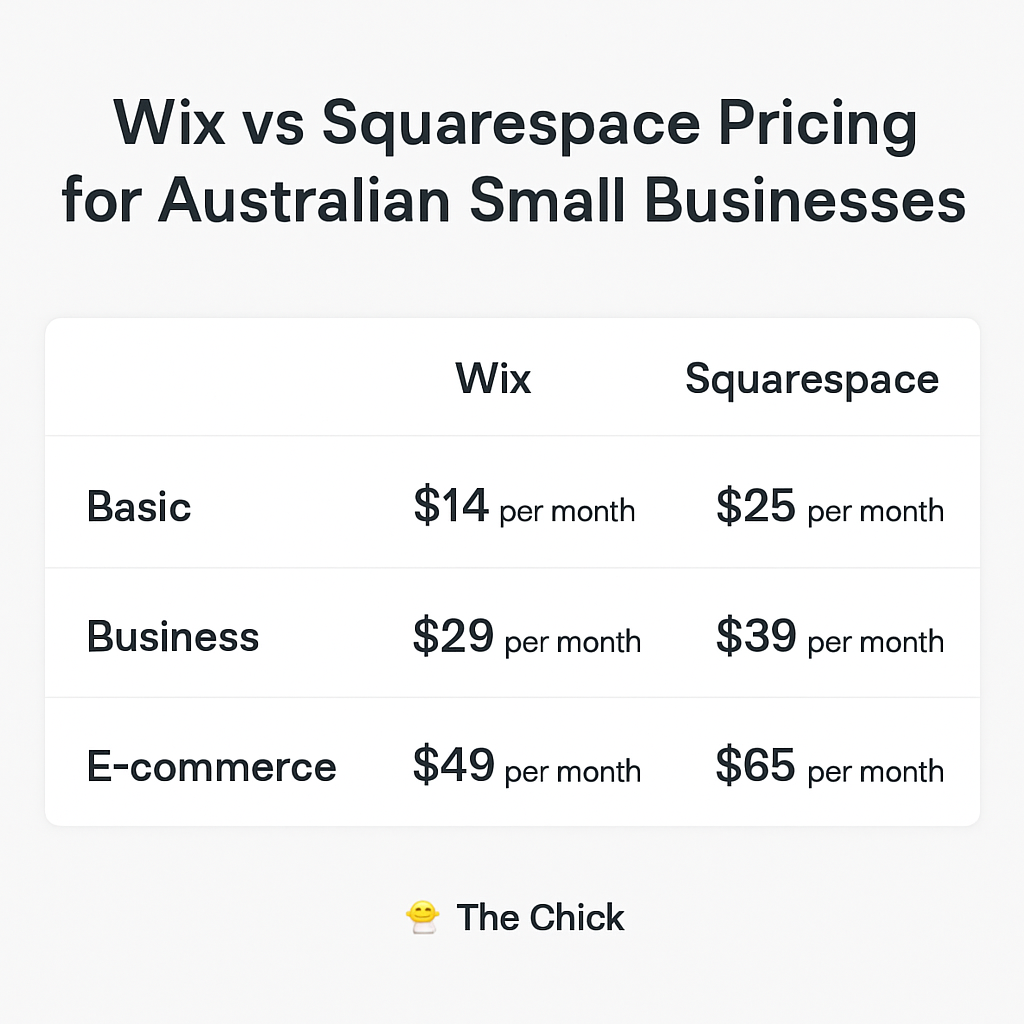
When you first sign up, Wix’s Combo plan sits at AU$13 per month (billed annually) and promises unlimited bandwidth plus a free domain for the first year. Squarespace’s Personal tier is a touch higher at AU$16 per month, but it bundles a custom domain and SSL straight away.
For a small Brisbane bakery that just needs a menu, a blog, and a contact form, either starter plan will do the job. The real question is – do you need the extra e‑commerce tools that come with the higher tiers?
Wix’s Unlimited plan (AU$19/month) removes Wix ads, adds more storage, and opens up the App Market – handy if you need a booking widget for hair‑stylist appointments on the Gold Coast.
Squarespace’s Business plan costs AU$28 per month and includes powerful e‑commerce features like unlimited products, discount codes, and a robust analytics dashboard. If you’re a Melbourne photographer selling prints, the built‑in inventory tools might save you a lot of extra plugins.
What we’ve seen work best is matching the plan to your revenue expectations. If you anticipate less than 50 sales a month, Wix’s Unlimited tier often feels lighter on the wallet. Once you break that ceiling, Squarespace’s Business plan becomes more cost‑effective because the transaction fees drop from 3% to 0%.
Wix’s Business Unlimited (AU$27/month) and Business VIP (AU$35/month) both include advanced e‑commerce, but the VIP adds priority support and a higher‑capacity CDN – useful for a wholesale business shipping large catalogs nationwide.
Squarespace’s Basic Commerce (AU$39/month) and Advanced Commerce (AU$55/month) bring in features like abandoned cart recovery and real‑time carrier shipping rates. For a Queensland retail store that relies on fast checkout, those extras can translate into more conversions.
Here’s a quick cheat‑sheet you can paste into your notes:
And don’t forget the hidden costs. Wix charges a separate domain renewal fee after the first year, while Squarespace includes the domain for the entire subscription period. Also, third‑party app subscriptions on Wix can add $5‑$20 per month each – something you’ll see more of if you lean on the App Market.
If you’re printing marketing flyers or product catalogs, you might also need a reliable print partner. We often recommend checking out Jiffy Print Online for affordable, fast turnaround – especially when you need fresh promo material to match a new site launch.
Bottom line: both platforms give you a solid foundation, but the sweet spot for most Aussie small businesses sits in the mid‑range Business plans. Align the tier with your projected sales, factor in any extra app or domain fees, and you’ll avoid surprise bill shocks when the annual invoice arrives.
When you compare wix vs squarespace on the design front, the first thing you notice is how each platform hands you the brush.
Wix boasts over 800 templates, covering everything from a Gold Coast hair salon to a Brisbane craft brewery. You can filter by industry, colour palette, or even “modern rustic”. That means you’ll likely find something that already feels close to the look you’ve imagined, and then you can tinker.
Squarespace, on the other hand, offers a tighter collection—around 100 high‑end templates—each polished to a photography‑centric finish. The designs are deliberately minimal, so they’re perfect for an art studio in Melbourne that wants every brushstroke to pop without extra clutter.
So, which library feels right for you? If you love hunting through dozens of options, Wix’s sheer volume can be a playground. If you prefer a curated set that looks runway‑ready out of the box, Squarespace’s curated gallery might save you hours.
Both builders use a visual editor, but the experience diverges. Wix’s editor lets you place elements anywhere on the canvas – even overlapping sections or floating buttons. It’s great for a boutique that wants a “hand‑crafted” vibe, because you can offset a product image just so.
Squarespace’s editor is more structured. You work with pre‑built “content blocks” that snap into place, keeping the layout clean. The trade‑off? Less freedom, but also fewer chances of breaking the design on mobile.
In our experience, small retailers in Queensland who need a fast launch benefit from Squarespace’s disciplined blocks. Those who enjoy tweaking every margin tend to gravitate toward Wix.
Squarespace recently rolled out Blueprint AI, which asks a few questions and then drafts a complete site – fonts, images, copy – in minutes. If you’re a solo entrepreneur juggling bookkeeping and inventory, that can be a lifesaver.
Wix has a similar “Wix ADI” (Artificial Design Intelligence), but it leans more toward a quick‑start homepage rather than a full‑featured store. You still end up customizing the layout yourself.
Want to see the AI tools in action? Check out Squarespace’s built‑in design tools for a walkthrough of Blueprint AI.
Wix lets you edit the mobile view separately, which is handy if you need a different arrangement for small screens. However, that also means an extra step – you might forget to tweak a button and end up with a broken checkout on a phone.
Squarespace automatically scales every template, ensuring consistency across devices. The downside is you can’t move things around as freely.
If you or a developer want to inject custom CSS or JavaScript, Wix opens a “Developer Mode” (Velo) where you can build full‑stack apps. It’s a bit of a learning curve but gives you the power to create a unique booking system for a Gold Coast surf school.
Squarespace restricts custom code to a header/footer snippet, which keeps the site fast but limits deep customisation. For most service‑based businesses, the native scheduling and invoicing blocks are enough.
| Feature | Wix | Squarespace |
|---|---|---|
| Template count | 800+ industry‑specific | ~100 curated |
| Design flexibility | Free‑form drag‑and‑drop | Block‑based, auto‑responsive |
| AI starter | Wix ADI (basic) | Blueprint AI (full site) |
Now that you’ve seen the trade‑offs, what’s the next step? Grab a free Wix account, play with a couple of templates, and see if you enjoy the freedom. Then hop onto Squarespace’s 14‑day trial and let Blueprint AI spin up a site. Compare the two mock‑ups side by side – the one that feels less like a chore is probably the better fit for your Brisbane bakery or Queensland consulting practice.
Remember, design is only half the battle; you still need solid hosting, SEO, and ongoing updates. That’s where a partner like Free Website Chick can step in, taking the finished design and turning it into a smoothly running online store.
🐣 The Chick
When you line up the two platforms in a side‑by‑side showdown, the first thing most Aussie owners ask is: which one feels easier to actually use on a daily basis? In the ongoing wix vs squarespace debate, ease of use is the make‑or‑break factor for a small business that can’t afford to spend weeks wrestling with a builder.
Wix gives you a free‑form editor where you can click, drag, and drop anything from a banner to a price tag anywhere on the page. It’s the kind of flexibility that makes a Brisbane bakery owner grin while arranging a fresh‑out‑of‑the‑oven photo next to a “Buy Now” button.
Squarespace, by contrast, works with pre‑made content blocks that snap into place. You pick a block, drop it, and the system takes care of margins and alignment. The result is a tidy, photo‑centric layout that a Melbourne photographer can publish in minutes without worrying about a rogue element breaking on mobile.
Actionable tip: If you love arranging each element manually, start with a Wix template, then use the “Stretch” handles to fine‑tune spacing. If you prefer a quick, clean look, pick a Squarespace block and focus on swapping images and copy.
Wix lets you switch to a dedicated mobile view and move elements around just for phones. That’s a lifesaver when a Gold Coast surf school needs a big “Book Lesson” button that sits lower on a small screen.
Squarespace automatically scales every block, which means you spend zero time on a separate mobile edit. The trade‑off? You can’t reposition that button without affecting the desktop layout.
Quick step: After publishing a Wix site, open the mobile editor, tap the call‑to‑action, and increase its size by 20 %. On Squarespace, simply check the built‑in mobile preview and make sure your key text stays above the fold.
Both platforms hide advanced tools behind menus, but they surface them differently. Wix’s Velo developer mode unlocks custom code, database collections, and API calls – great for a wholesale distributor in Queensland who needs a bespoke inventory sync. The downside is a steeper learning curve; you might spend an afternoon watching tutorials before you feel comfortable.
Squarespace keeps things tidy. The only “code” you can add lives in a header/footer snippet, which is perfect for inserting a Google Analytics tag but not enough for a custom booking engine. For most service‑based businesses, the built‑in scheduling block does the job.
What to do: If you anticipate needing custom logic, allocate a “sandbox” week to experiment in Wix’s dev mode. If you’re happy with out‑of‑the‑box tools, stick with Squarespace’s simpler settings and skip the extra training.
Wix offers 24/7 chat and a massive app market with tutorials for each integration. A small retailer in Adelaide can pop open the “Live Chat” window at midnight and get a step‑by‑step guide to connect a local Australian payment gateway.
Squarespace leans on a curated knowledge base, email support, and a community forum. The articles are written in a clean, visual style that mirrors the platform itself – handy when you need a quick answer about SEO settings.
Practical move: Bookmark the Wix help centre article on “Mobile optimisation” before you start tweaking, and keep a Squarespace “Design blocks” guide open while you assemble pages. Having the right doc at hand cuts friction dramatically.
In real‑world tests, a Brisbane café can spin up a basic Wix site in about 3‑4 hours if they use a template and skip developer mode. The same café can get a Squarespace site live in roughly 2‑3 hours because the block system forces a consistent layout.
However, if you need a custom booking calendar or a loyalty program, Wix may add another hour or two of setup, while Squarespace might require a third‑party integration that takes longer to configure.
Action checklist: 1) Choose a template that matches your industry. 2) Replace placeholder images with your own product shots. 3) Set up payment and tax settings (both platforms have Australian GST options). 4) Test the checkout on both desktop and mobile. 5) Publish and share the link with a friend for a quick usability test.
Bottom line: Both Wix and Squarespace score high on usability, but they play to different strengths. Wix wins on granular control and mobile tweaking, Squarespace wins on speed and polish. Pick the one that matches how you like to work, and you’ll shave hours off your launch timeline.
🐣 The Chick
When you’re juggling a Brisbane bakery or a Gold Coast surf school, the first thing you wonder is: will Google actually find my site? That’s the heart of the wix vs squarespace debate – which platform hands you the right SEO tools without turning the process into a tech nightmare?
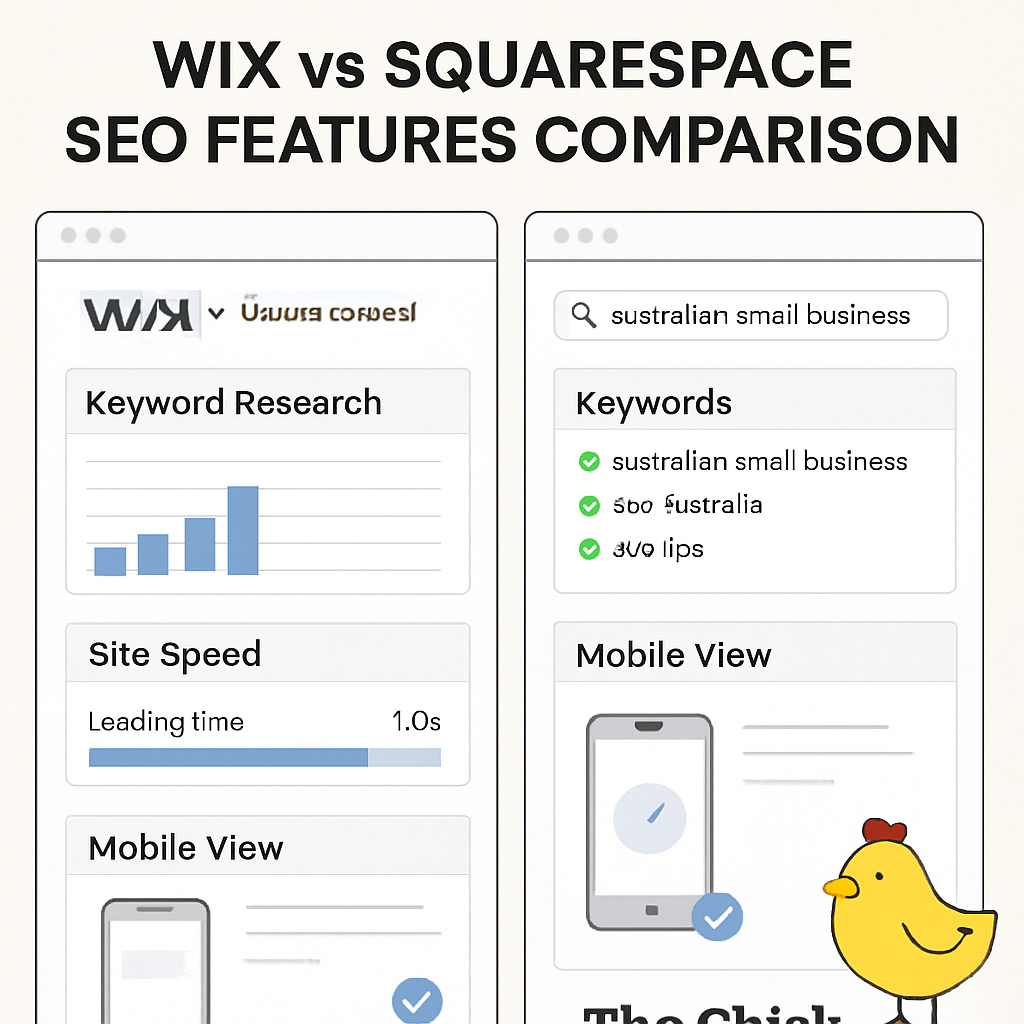
Both Wix and Squarespace ship with a dashboard that feels a bit like a cheat‑sheet for Google. Wix calls it the SEO Wizard – it walks you through meta titles, descriptions, and even suggests alt‑text for your images. Squarespace, on the other hand, bundles SEO settings right into the page editor, so you can tweak headings and URLs on the fly.
In our experience, the Wix Wizard feels more step‑by‑step, which is great if you’re new to SEO. Squarespace’s approach is sleeker – you get a clean panel, but you need to know what you’re looking for. Either way, you end up with the basics covered: title tags, meta descriptions, and custom URLs.
Ever typed a URL into the address bar and wondered why it looks like a random string of numbers? Wix used to add “-html” endings, but the latest updates now generate tidy, hyphen‑separated slugs that you can edit. Squarespace has always produced clean URLs, automatically stripping out unnecessary characters.
For a local Aussie retailer, that matters because a clear URL – like yourstore.com.au/handcrafted-cookies – signals relevance to both users and search engines. It also makes it easier to share on Instagram or in a printed flyer.
Page load time is a silent sales killer. If a visitor waits more than three seconds, you could lose a sale before they even see your product. Wix runs on a global CDN, but heavy apps can drag the speed down. Squarespace’s hosting is tightly integrated with its templates, often delivering snappier performance out of the box.
Quick tip: run a free Google PageSpeed test after you publish. If you see a low score, consider trimming unused Wix apps or swapping to a lighter Squarespace template. A few seconds saved can boost both rankings and checkout conversions.
Google now indexes the mobile version of your site first. Wix lets you edit the mobile view separately, which is handy if you need a big “Book Now” button for a Gold Coast surf school. The flip side is an extra step – you might forget to optimise a footer link and end up with a broken mobile experience.
Squarespace auto‑scales every template, so what you design on desktop looks good on a phone without extra tweaking. The trade‑off? Less control over exact placement. For most small businesses, that automatic consistency wins the day.
Schema markup tells search engines what your content actually is – product, recipe, event, you name it. Wix includes a simple schema editor where you can tag products, reviews, and FAQs. Squarespace adds basic schema automatically for blogs and products, but you’ll need to drop a code snippet for richer types like “LocalBusiness”.
If you run a Brisbane café, adding the LocalBusiness schema can surface your address, opening hours, and phone number straight in the SERPs. That little extra can drive foot traffic without you lifting a finger.
So, which platform gives you the SEO edge? Think about your comfort level: do you want a guided wizard (Wix) or a streamlined, hands‑off setup (Squarespace)? Both can rank well – the difference is how much time you’re willing to invest in fine‑tuning.
Bottom line: pick the builder that matches the amount of SEO babysitting you’re ready to do. If you love ticking boxes and learning as you go, Wix’s step‑by‑step tools might be your friend. If you’d rather set it and forget it, Squarespace’s built‑in optimisation will keep you on the right track.
Ready to see the numbers for yourself? Run a quick audit with any free SEO tool after you launch – you’ll instantly spot where one platform outshines the other.
🐣 The Chick
When you finally pick a platform in the wix vs squarespace showdown, the real test begins: can you keep the site humming without pulling your hair out? The good news is both builders come with a toolbox of support, and there are plenty of Aussie‑friendly resources to back you up.
Wix’s Help Centre reads like a searchable FAQ that covers everything from adding a contact form to tweaking schema markup. What we love is the step‑by‑step screenshots – perfect for a busy café owner in Brisbane who just wants the “Open Hours” widget live by Friday.
Squarespace’s Knowledge Base is a bit more visual, with short video clips (yes, they’re embedded in the articles, not full‑blown tutorials). If you’re the kind of person who skims a few frames and gets the gist, you’ll feel right at home. Both sites let you filter by topic, so you can jump straight to “SEO basics” or “e‑commerce checkout”.
There’s a thriving Wix Community on Facebook where small business owners from the Gold Coast swap app recommendations. One thread I’ve seen a Melbourne florist post about a glitch with the “Add to Cart” button, and within minutes another member dropped a fix that saved the day.
Squarespace has its own forum, but the real goldmine is the “Squarespace Australia” group on Reddit. People post screenshots of their storefronts, ask for colour‑palette advice, and even organise local meet‑ups in Brisbane. The peer‑to‑peer vibe often feels less corporate than the official docs.
Websites like WPBeginner (despite the name, they cover Wix and Squarespace) publish cheat‑sheet articles that break down the SEO wizard into bite‑size tasks. A quick Google search for “Wix SEO checklist 2024” will land you a printable PDF that even a non‑techy can follow.
For Squarespace, the blog at Squarespace Secrets (not a competitor, just a fan site) curates case studies – like how a Byron Bay surf shop boosted organic traffic by 23 % after tweaking their image alt‑text. Those real‑world numbers are useful when you need to justify a tweak to your accountant.
Eventbrite often lists free “Web Design for Small Business” workshops in Queensland. Last month I attended a session hosted by a local digital agency; they walked through the Wix App Market and showed how to integrate a Stripe payment gateway that’s already set up for Australian GST.
Squarespace runs quarterly webinars aimed at Australian retailers, covering topics like “Mobile‑first design for the Aussie market”. The live Q&A lets you ask about regional shipping integrations – a lifesaver if you ship handmade candles from Melbourne to Sydney.
If you’d rather focus on baking croissants or crafting jewellery, our team at Free Website Chick can take the grunt work off your plate. We’ve helped dozens of Queensland entrepreneurs set up local‑business schema, optimise image sizes for faster page loads, and keep the site’s plugins up to date.
Think of us as the “tech‑savvy friend” who never sleeps. You get a monthly health check, quick fixes for broken links, and a backup plan that makes sure your site stays online even if Wix or Squarespace rolls out a surprise update.
Bottom line: you don’t have to go it alone. Between the built‑in docs, the Aussie‑centric community buzz, and a little extra help from specialists, you’ll have the resources you need to keep your site humming, no matter whether you’re on Wix or Squarespace.
🐣 The Chick
So, after wading through pricing tables, design freedom, and SEO quirks, where does that leave you?
If you’re a Brisbane baker who needs a quick‑launch store, Wix’s free tier and app market can keep you moving. If you run a Melbourne studio and crave pixel‑perfect galleries with zero fuss, Squarespace’s tidy blocks will save you hours.
What matters most is the ongoing maintenance – the hidden work that keeps your site humming. That’s where a solid management plan shines. In our experience, businesses that schedule a monthly health check avoid nasty surprises like broken checkout links or slow page loads.
Here’s a quick 3‑step wrap‑up you can act on today:
Need a deeper dive into keeping your site in tip‑top shape? Check out Effective website management for small business: A practical Australian guide for a step‑by‑step checklist.
And while you’re polishing your visuals, consider adding a professional headshot or product shoot from Alfapics photography – crisp images can boost conversion rates by up to 23 % according to recent Aussie e‑commerce studies.
Bottom line: the right platform plus a little ongoing care equals a website that works as hard as you do. Choose, test, maintain, and watch your online shop thrive.
🐣 The Chick
In our experience the core split comes down to flexibility vs. polish. Wix gives you a free‑form editor, hundreds of apps and the ability to drop custom code – perfect if you love tinkering or need a niche booking widget for a Gold Coast surf school. Squarespace, on the other hand, locks you into sleek, mobile‑ready blocks that look great out of the box, which saves time for a Melbourne studio that just wants gorgeous galleries without endless tweaking. Choose the builder that matches how you work, not just the features list.
Yes, if you need deep customisation. Wix’s Velo developer mode lets you build databases, connect to local Australian payment gateways and even script a loyalty program for a Queensland wholesale business. The learning curve is steeper, so set aside a sandbox week to prototype. Squarespace does offer built‑in scheduling and simple e‑commerce, but you can’t inject a full‑stack inventory sync without a third‑party add‑on. For most service‑based owners, the native Squarespace tools are enough; for complex workflows, Wix wins.
Absolutely. Squarespace’s image pipelines automatically compress and serve WebP variants, so a Melbourne artist can upload 3000 px photos and still see sub‑second load times on a phone. The trade‑off is you can’t manually tweak the compression level, but the platform’s CDN and lazy‑load settings keep the page speedy. If you notice a slowdown, simply resize images to under 2 MB before upload – a quick step that preserves visual impact and keeps Google happy.
Both platforms charge a monthly fee, but hidden costs add up differently. Wix’s free tier is tempting, yet every extra app you add (think booking, reviews or email marketing) usually carries a subscription of its own. Squarespace bundles most essential features into the Business and Commerce plans, so you pay one price and avoid surprise add‑ons. In practice, we’ve seen Brisbane retailers save up to 15 % annually by staying on Squarespace’s all‑in‑one plan versus layering multiple Wix apps.
Both Wix and Squarespace ship with on‑page SEO wizards that let you edit meta titles, descriptions and alt‑text. Wix’s step‑by‑step guide is great for beginners; Squarespace’s panel feels more streamlined for those comfortable editing URLs directly. Beyond the built‑ins, run a free PageSpeed Insights test after launch, add local business schema (you can paste a snippet into Squarespace’s header or use Wix’s schema editor), and submit a sitemap via Google Search Console. Those three actions lift visibility regardless of the builder.
If you’d rather focus on baking croissants or crafting jewellery than chasing broken links, a managed service makes sense. We handle quarterly audits, plugin updates, image optimisation and backup restores – the exact chores that trip up busy Queensland entrepreneurs. Think of it as a monthly health check: you get a report, a quick fix for any 404s, and peace of mind that your Wix or Squarespace store stays fast, secure and compliant with Australian GST rules.

